
30-Day Challenge Ideas for Self-Improvement
Updated
The best 30-day challenge ideas are small enough to do on your worst day and specific enough to check off: read 10 pages, walk 20 minutes, write 500 words. Pick one, set 30 days, and decide before day one what a missed day means.
Below are ideas for your body, your focus, making things and quitting something, each with a daily checklist you can copy. Most come from the ready-made challenges in the Lock In app; a few are our own.
How to choose a 30-day challenge
Make it small enough for bad days
Thirty days will include a few bad ones: a late night, a trip, a day you just don’t want to. Pick a daily amount you could still do then. Ten pages, not a chapter. Twenty minutes, not an hour. You can do more on good days; the challenge is the minimum.
Pick one challenge, not five
Stacking a reading challenge, a running challenge and a no-spend challenge in the same month triples the ways to slip. Run one. When it’s done, start the next with what you learned. This is the core of how to lock in: one goal, a set number of days, a short daily list.
Make every todo checkable
Each todo needs a yes-or-no answer by bedtime. “Get fit” can’t be checked. “Walk for 20 minutes” can. Two to four todos is plenty. For help writing them, see how to set daily goals.
Decide what a missed day means
Settle this before day one, not on a tired evening. In Lally et al. (2010), missing one opportunity to perform the behavior did not materially affect the habit formation process, so an all-or-nothing rule is a commitment you choose, not a scientific requirement. How to be consistent weighs both approaches.
30-day challenge ideas with daily checklists
The first seven ideas are the 30-day challenges in the Lock In app’s catalog. Each shows the app’s difficulty rating, its tagline and its daily todos, quoted word for word. The last group is ours, built to the same shape.
Body
- Move Every Day (easy). “A walk, a few push ups, and water.” Daily todos: “Walk for 20 minutes”, “Do 10 push ups”, “Drink two litres of water”. A gentle place to start if you don’t move much right now.
- Run Streak (moderate). “At least two kilometres, every day.” Daily todos: “Run at least 2km”, “Stretch for 5 minutes”. Suits people who already run, since every one of the 30 days is a running day.
Focus
- Read Daily (easy). “Ten pages a day, no exceptions.” Daily todos: “Read 10 pages”, “Write one sentence about what you read”. The sentence leaves you with a record of the whole month.
Make something
- Ship Daily (moderate). “Something finished and out the door, every day.” Daily todos: “Ship one thing, however small”, “Spend 30 minutes on the next one”, “Write one line about what you changed”. Fits work you can release in small pieces, such as code, design or writing.
- Write 500 (moderate). “Five hundred words a day.” Daily todos: “Write 500 words”, “Name tomorrow’s subject before you stop”. The second todo means you never start a day facing a blank page.
- Draw Every Day (easy). “One drawing, finished or not.” Daily todos: “Draw for 15 minutes”, “Keep it, good or not”. Keeping every drawing removes the excuse to skip a day over a bad one.
Break something
- Dry Thirty (moderate). “A month without alcohol.” Daily todos: “No alcohol”, “Drink two litres of water”, “Be in bed by your target time”. Like No Scroll, the app’s other quitting challenge, it pairs the “no” with things to do, so each day has more to check off than abstaining.
More ideas to build yourself
These aren’t in the app’s catalog. Each follows the same shape: two todos you can check every day. Start from a blank lock-in or a paper checklist.
- Language practice: Do one 15-minute lesson. Say five new words out loud.
- Instrument practice: Practice for 20 minutes. Record one take.
- No-spend month: No non-essential purchases. Write down every purchase you make.
- Cook at home: Cook one meal at home. Write down what you made.
- Early start: Be out of bed by 7:00. Make the bed before you check your phone.
When 30 days is too short or too long
Thirty days is a common length, not a magic one. The Lock In catalog has other lengths:
- 7 days: First Seven, “One week. Deliberately small.” A test run before you try a month.
- 21 days: Deep Work, First Hour and No Scroll, three challenges about attention and phones.
- 60 days: Strength Base, “Two months of daily resistance work.”
- 75 days: The Reset, five todos a day. “Everything at once, for two and a half months.”
- 121 days: The Great Lock In, the longest in the catalog. Read its dates and rules on The Great Lock In page.
If you’ve never finished a challenge, start with seven days. If 30 felt easy, try a longer run before you add more todos.
How to track a 30-day challenge
Draw 30 boxes on a sheet of paper, one per day, and write your todos above them. Fill in a box only when every todo is done, and only on that day. Keep the sheet where you’ll see it each evening.
An app does the same job with fewer loopholes. It knows what day it is, it can remind you, and it can refuse to let you fill in yesterday’s box today.
Where Lock In helps
Lock In comes with 14 ready-made challenges in five groups, from the 7-day First Seven to the 121-day Great Lock In. Seven of them are 30 days long.
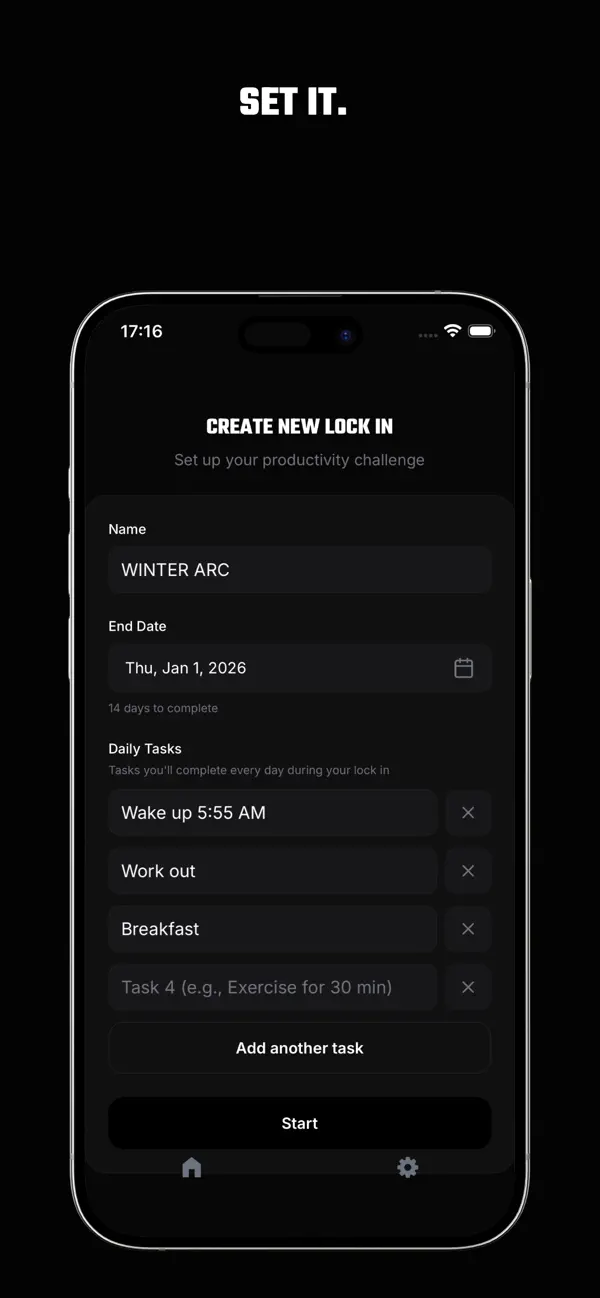
- Start from a challenge. Open one to see its tagline, difficulty, rationale and todos. Starting it fills in the create form, and you can edit the name, end date and todos before you commit.
- Or build your own. The blank form is always free. Signed in, you can also describe your goal in a sentence and get a drafted lock-in to edit. Drafting is free until you create your first lock-in; after that, it’s part of Lock In Pro.
- Every todo, every day. The same todos run every day of the challenge, with no rest days. Check them all and bank the day before midnight your time. Miss a day and the run fails: no grace day, no streak freeze.
- Restart or stop. After a failed run, restart from day 1 with the same todos, and the app counts your attempts. Or abandon it.
- A score for every run. Each run gets a completion score out of 100, weighted across progress, longest streak and consistency.
Common questions
How do 30-day challenges work?
You pick one behavior, define what counts as done each day and repeat it for 30 days in a row. Most people track it with a simple checklist. The main choice is what happens after a miss: some people carry on, others start again from day one.
How do I make a 30-day challenge?
Write the goal in one sentence. Add two to four todos you can check every day, each with a number: pages, minutes, words. Choose 30 days starting today (today is day one, so the end date is 29 days from now), decide what a missed day means, and put the checklist where you’ll see it daily.
Is 30 days long enough to change a habit?
Often not, if “change” means the behavior feels automatic. In a 12-week study (Lally et al., 2010), the participants whose data fit the model well took a median of 66 days, with a range of 18 to 254, for a new daily behavior to become about as automatic as it would get. Treat 30 days as a solid first block of practice, not a finish line. When it ends, you can start another run.
What is a 66-day challenge?
Usually a challenge sized to that 66-day median. It comes from one small study where the range ran from 18 to 254 days, so day 66 isn’t a threshold for you. Lock In has no 66-day entry in its catalog, but you can set any length up to 365 days.
What’s the best app for a 30-day challenge?
One whose rules match the challenge you picked. If you want ready-made 30-day challenges, a fixed end date and a missed day that counts, that’s what the Lock In app is built for.