
How to Set Daily Goals You Can Finish Every Day
Updated
Here’s how to set daily goals you can finish every day: pick one bigger goal, then write two to four small todos that serve it, each with a clear yes-or-no answer by bedtime. Make every todo small enough to repeat on a bad day, and give the list an end date so it isn’t open-ended.
That’s the whole method. The rest of this guide shows how to write the todos, how many to pick, and real examples you can copy.
What a daily goal is, and how it differs from a to-do list
A to-do list changes every day. It holds one-off tasks: book a haircut, reply to an email, buy printer paper. You add to it faster than you clear it, and it never really ends.
A daily goal is an action you repeat every day because it moves one bigger goal forward. “Write 500 words” is a daily goal if the bigger goal is finishing a draft. “Walk for 20 minutes” is a daily goal if the bigger goal is moving more.
Good daily goals share three traits:
- Checkable. At bedtime the answer is yes or no. “Read more” fails this test. “Read 10 pages” passes.
- Repeatable. The same list works on Monday and on Sunday, on a good day and on a bad one.
- Connected. Every item serves the same bigger goal. If one doesn’t, it belongs on a different list.
How to set daily goals in four steps
Start from one bigger goal
Write the bigger goal as one sentence: finish the first draft of a novel, get back into running, stop scrolling in bed. One goal keeps the daily list short and makes each day’s choice obvious.
If three goals are competing for the same evening, pick one for now. The others can wait for the next run. If you’re still choosing, the guide on how to lock in on one goal walks through that decision.
Write two to four checkable todos
Turn the goal into the few actions that would move it forward today. Put a number on each one: minutes, pages, words, kilometers. A number makes the todo checkable, and a checkable todo can’t be half done.
- “Exercise” becomes “Walk for 20 minutes”.
- “Work on the book” becomes “Write 500 words”.
- “Use my phone less” becomes “No phone for the first hour after waking”.
Make them repeatable
Size each todo for your worst day, not your best. A 90-minute gym session looks good in a Sunday plan and falls apart on the first late night at work. A 20-minute walk survives it.
Keep the list the same every day. If a todo only makes sense on some days, such as leg day on Mondays, rewrite it so it works daily (“Train for 30 minutes”) or leave it off this list.
Pick a length
Give the list an end date. An open-ended list slowly turns into background noise. A fixed length tells you exactly what you signed up for and when you’re done.
Seven days makes a good test run. Twenty-one or 30 days suits a first real attempt, and longer runs make sense once you’ve finished a shorter one. For ready-made lists with a length attached, see these 30-day challenge ideas.
Daily goals examples
Here are daily goals grouped by area. Lines marked “in-app challenge” quote the todos of a ready-made challenge in the Lock In app, word for word. Lines marked “our example” are ours. Borrow freely, but keep each list to one area.
Focus
- Deep Work (in-app challenge): “Do 45 minutes with your phone in another room”, “Write down tomorrow’s first task before you stop”.
- First Hour (in-app challenge): “No phone for the first hour after waking”, “Get outside for 10 minutes”.
- Our example: Study for 30 minutes before you open any messages. Plan tomorrow’s top three tasks before you close the laptop.
Body
- Move Every Day (in-app challenge): “Walk for 20 minutes”, “Do 10 push ups”, “Drink two litres of water”.
- Run Streak (in-app challenge): “Run at least 2km”, “Stretch for 5 minutes”.
- Our example: Get 8,000 steps. Be out of bed by 7:00.
Creative work
- Write 500 (in-app challenge): “Write 500 words”, “Name tomorrow’s subject before you stop”.
- Draw Every Day (in-app challenge): “Draw for 15 minutes”, “Keep it, good or not”.
- Ship Daily (in-app challenge): “Ship one thing, however small”, “Spend 30 minutes on the next one”, “Write one line about what you changed”.
- Our example: Practice guitar for 20 minutes. Record one take.
Quitting something
- No Scroll (in-app challenge): “No social feeds today”, “Read 10 pages instead”, “Get outside for 15 minutes”.
- Dry Thirty (in-app challenge): “No alcohol”, “Drink two litres of water”, “Be in bed by your target time”.
- Our example: No food delivery apps today. Cook one meal at home.
Notice the pattern in the quitting lists: each “no” comes with a “do”. The time you get back has somewhere to go, and the day has something to check off besides not doing a thing.
How many daily goals should you have?
Two to four is a good range for most lists. One todo is fine too, if it’s the only thing that matters. Past four, look again: a long list usually means two goals sharing one list, or todos sized for your best day.
Length matters more when every todo has to be done for the day to count. Each item you add is one more way to miss the day, so ten small todos can be harder to finish daily than two bigger ones. Run the short list first. You can start a longer one after you’ve finished it.
How to track daily goals
Any tracker works if you check it every day. Three common options:
- A paper checklist. Write the todos down the side and the dates across the top. Tick each box on the day, not in a batch at the end of the week.
- A wall calendar. Mark one X per day once every todo is done. The row of Xs is hard to ignore.
- An app. Useful when you want reminders, a record you can’t quietly backfill, or a rule the tracker enforces for you.
Whatever you use, decide before day one what a missed day means. Some people allow one and carry on; others start over. Both are choices, and how to be consistent covers the tradeoffs. Deciding ahead keeps you from renegotiating on a tired evening, and holding yourself accountable shows how to make that decision stick.
Where Lock In helps
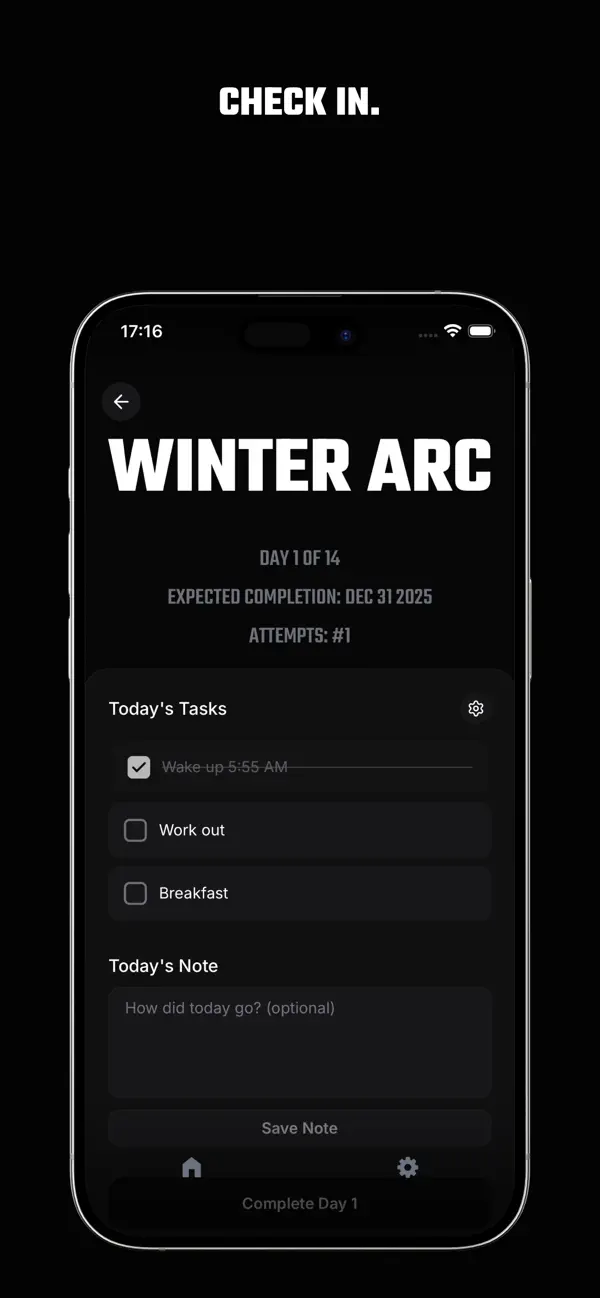
Lock In is built around this method. A lock-in is one goal, a number of days (up to 365) and a list of daily todos (up to 20, though the advice above still stands).
- The same todos every day. A lock-in runs one list for the whole run. There are no rest days and no per-weekday lists, so write todos that work every day.
- Every todo, or the day doesn’t count. The day banks only when every todo is checked, before midnight your time. The daily note is optional. With Lock In Pro, you can speak the note and get it back as text you can edit.
- A missed day ends the run. There’s no grace day and no streak freeze; restart from day 1 with the same todos, and the app counts your attempts. With an account, optional reminders come at 9 am and 9 pm your time, the evening one only if today isn’t banked yet.
- Somewhere to start. Pick one of 14 ready-made challenges and edit its todos before you begin. Signed in, you can also describe your goal in a sentence and get a drafted lock-in to edit. Drafting is free until you create your first lock-in; after that, it’s part of Pro. The blank form is always free.
Common questions
What are examples of daily goals?
Read 10 pages. Walk for 20 minutes. Write 500 words. No social feeds today. Good examples are specific actions with a number or a clear yes-or-no answer, and they all serve one bigger goal. The lists above group more by area.
What should be on a daily goals checklist?
Only the two to four actions that move your one bigger goal forward, written so each can be checked. Leave off one-off errands; they belong on a to-do list. If an item can’t be done every day of the run, rewrite it or drop it.
How do I set daily goals and actually achieve them?
Nothing guarantees it, but three habits help. Keep the list short enough for your worst day, check it off on the day itself, and decide in advance what happens when you miss one. A list sized for your best day tends to break on your worst.
What is the best app for daily goals?
The one whose rules match yours. If you want rest days and streak freezes, pick a habit tracker that offers them. If you want one goal, a fixed number of days and a missed day that counts, that’s what the Lock In app is built for.